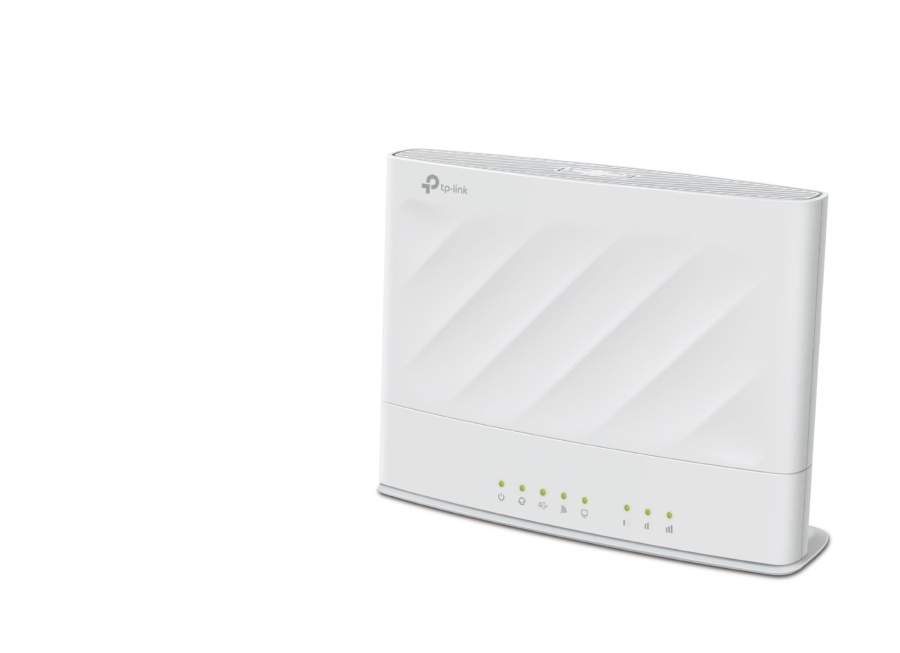
TP-Link Archer MX700 AX1500 4G LTE Advanced Cat6 Gigabit Router
4G+ Cat6 · AX1500 Wi-Fi · Gigabit PortsAvailable on backorder
DescriptionThe TP-Link Archer MX700 (model Archer MX700) is a dual-band AX1500 Wi-Fi router with…
The TP-Link Archer MX700 (model Archer MX700) is a dual-band AX1500 Wi-Fi router with a built-in 4G+ Cat6 modem, so it can share a mobile network connection without a separate modem. Its 4G+ Cat6 link supports up to 300 Mbps download and 50 Mbps upload, while Wi-Fi reaches up to 1201 Mbps at 5 GHz and 300 Mbps at 2.4 GHz.
What Wi-Fi and mobile speeds does the Archer MX700 offer?
- 4G+ Cat6: up to 300 Mbps download and 50 Mbps upload
- 5 GHz Wi-Fi: up to 1201 Mbps
- 2.4 GHz Wi-Fi: up to 300 Mbps
- Wi-Fi standards: IEEE 802.11a/n/ac/ax (5 GHz); IEEE 802.11b/g/n (2.4 GHz)
- Mobile network modes: 4G and 3G
Which ports does the router provide?
- LAN: three Gigabit LAN ports
- WAN/LAN: one Gigabit WAN/LAN port
What antennas and SIM card does it use?
- Antennas: internal 4G/3G and Wi-Fi antennas, plus two external antenna ports
- SIM card type: Nano SIM
- Dimensions: 199.7 × 148.6 × 67.5 mm
How do you set up and manage the network?
- Insert an activated Nano SIM card without a PIN lock to use mobile network service
- Set up and manage your network with the TP-Link Tether App
- Network management features include parental controls and QoS
- Compatible with EasyMesh devices
Questions & answers
What kind of SIM card does the Archer MX700 need?
It uses a Nano SIM card. The SIM must be activated and must not have a PIN lock enabled to use mobile network service.
Can the Archer MX700 be combined with other mesh devices?
Yes, it is compatible with EasyMesh devices, which allows it to be part of a mesh network.